
General
- General
- Solutions
- Products
- Cases
- Technology
- News
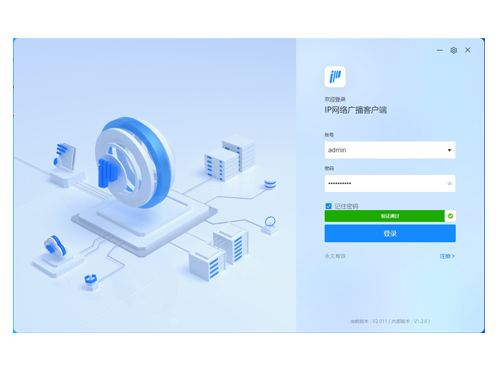
The sub-control workstation software uses IP network (LAN, WAN) to remotely log in to the server to realize functions such as remote audio playback, real-time acquisition and broadcasting, session management, and broadcasting room speech.
* The digital client control software runs on desktop or laptop computers with domestic operating systems or Windows operating systems. Users can control the broadcast system after logging in and being authenticated by the system server.
* The client software remotely logs into the server via a network (LAN, WAN). Multiple client software programs can log in to the server simultaneously, and each client software program operates independently.
* Supports multiple login methods, including account password, PIN code, and pattern password; supports setting limits on the number of failed login attempts and allows for customizable lockout time.
* Enables terminal status viewing (displaying statistical data on terminal idle, busy, frozen, faulty, and offline status; clicking to view details in the device list), audio playback, monitoring, broadcasting and intercom, and session status monitoring.
* Supports viewing the status and operation of all terminal types, allowing multi-party intercoms to be initiated with intercom terminals and broadcasts to broadcast terminals.
* Supports real-time viewing of terminal operating status, volume, and tasks, and allows setting terminal volume in the terminal status interface. Terminal status supports both block view and list view modes.
* Supports creating text broadcast tasks, enabling text-to-speech conversion with background adjustments to speech rate, playback audio, and loop count.
* Supports creating sound card capture tasks, allowing real-time capture and playback via the sound card of the computer hosting the sub-control client. Captured content can be recorded and stored.
* Supports creating music playback tasks, allowing playback of local files and selection of multiple songs for sequential, loop, or random playback.
* Supports initiating a monitoring function; selecting a monitoring terminal in the session allows listening to the content of a specific task.
* Supports remote real-time paging broadcasts to a specific terminal/partition/the entire region, with the option to select a network paging microphone for real-time intercom.
* Supports viewing terminal online/offline records on the sub-control client, with the ability to set a pop-up notification for terminal disconnection.
* Supports configuring and managing temporary scheduled tasks, providing multiple audio source options (music playback, sound card capture, terminal capture).
* Supports categorized and user-specific management of media files, allowing configuration of public/private folders, with private files used independently.
* Supports one-click alarm triggering; alarm tasks are preset in the background and triggered by the client with a single click in emergencies.
* Supports displaying server time (year, month, day, hour, minute, second) and server time synchronization.
* Supports setting multiple time points for music playback.
* Supports multilingual functionality, with one-click language switching. Supports Simplified Chinese, Traditional Chinese, English, Korean, Portuguese, Spanish, Russian, French, and Arabic, supporting different national languages.
* Today's tasks support list or timeline mode display. In timeline mode, users can view the distribution of tasks at various time points and switch to view the task history for the past 30 calendar days. Supports temporarily disabling today's tasks once a day, automatically resuming the next day, facilitating adjustments to bell-ringing arrangements during breaks in special circumstances such as rain.
* Supports selecting audiobook mode when setting bell-ringing and timed tasks. In this mode, users can choose loop playback or random playback. Audiobook mode has a memory function, remembering the last playback progress and resuming playback from where it was interrupted. Users can define the last playback progress, timer settings, playback count, and manage task end time.
* Supports enabling exam mode and configuring terminal freeze time. During the freeze period, the terminal is prohibited from performing tasks, suitable for exams or rest periods. In case of network or power outages during exams, the system employs real-time system monitoring and device self-checking technology, ensuring a listening backup switching latency of less than 0.03 seconds, achieving truly smooth, lag-free, and delay-free exam listening backup.
* Supports users querying media file resources in the media library, including public folders, private folders, and local folders (e.g., accessed from external USB drives or hard drives), and allows filtering and searching of these files.
* Supports users viewing real-time footage from monitoring points bound to devices on the platform, and supports broadcasting to broadcast devices associated with specified monitoring devices.
* Supports creating music tasks in the cloud broadcasting room, enabling the playback of music from the broadcast server to specified terminals or groups.
* Supports local log recording. When a terminal is offline, pop-up windows and playback sound alerts are provided to keep track of terminal information; pop-up alerts can be disabled to avoid affecting regular user experience.
* Supports automatically loading system-assigned scene configurations for different accounts.
* Supports full-process management of examination scenarios. It supports automatic execution of preset pre-exam inspection tasks, covering industrial control computer testing (system uptime, system CPU, remaining memory space, remaining hard disk space), network monitoring (maximum PING value, network packet loss rate, node detection), and device testing (device sound card testing, device memory usage, device packet loss rate). Users can submit inspection reports with one click. It supports automatically locking exam time slots according to the configured exam schedule, and timed playback of pre-exam instructions and listening comprehension tests. It also supports emergency broadcasting by exam administrators via the client, with operation results synchronously displayed in the log. The system supports exam log recording, automatically recording exam process operations and organizing them into an exam log along a timeline, allowing real-time viewing of events (terminal disconnection events, user modifications to the exam schedule).
* Supports supermarket/shopping mall scenario management. It supports automatic execution of configured broadcast strategy control tasks, supports multi-terminal playback, and allows users to perform emergency broadcasting. The homepage aggregates today's tasks (timed playback) and supermarket/shopping mall terminal execution status (task execution information, terminal online status), and allows setting up real-time push notifications and manual announcement requests. It supports background music control, allows users to switch background music, and supports users to adjust the volume and pause/play music in real time.
Please leave a message if necessary, we will contact you as soon as possible!