General
- General
- Solutions
- Products
- Cases
- Technology
- News
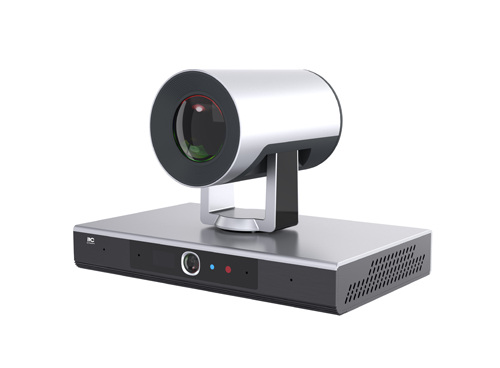
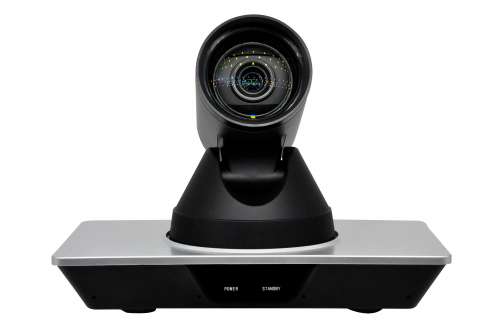
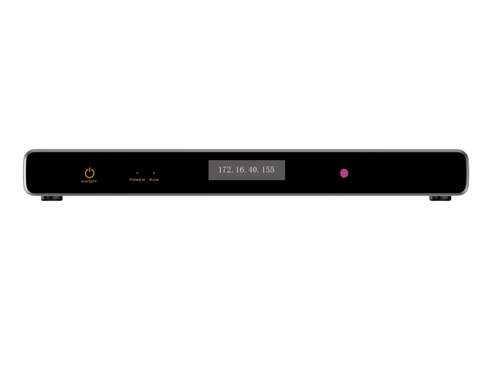
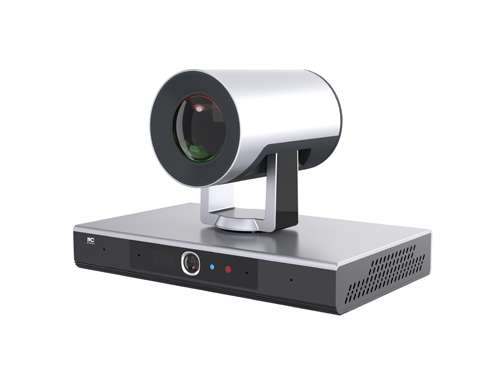
The brand-new all-in-one dual-camera HD video conferencing terminal integrates a 4K 12x PTZ HD camera and a 4K panoramic camera, with a built-in array microphone. It boasts an exquisite appearance and excellent performance, supports H.265 4K60 codec, achieving ultra-HD quality with ultra-low bandwidth, and simplifies installation.making it suitable for various small and medium-sized meeting venues.
* Employs an integrated structure with a built-in hardware audio and video processing unit. It utilizes a dual operating system design, combining domestically developed embedded Linux and Android 12, supporting switching between the two systems.
* The terminal includes a built-in HD PTZ camera with a 12-megapixel 1/2.8-inch CMOS lens, 12x optical zoom, supporting up to 4K30 ultra-HD resolution, a maximum diagonal viewing angle (DFoV) of 88.9°, and a maximum horizontal viewing angle (HFoV) of 80.5°.
* The terminal also includes a built-in panoramic camera with an 8-megapixel 1/2.8-inch fixed-focus lens, supporting up to 4K60 ultra-HD resolution, a diagonal viewing angle (DFoV) of 130°, and a horizontal viewing angle (HFoV) of 120°.
* The terminal features four array microphones with a sampling rate of 48kHz, supporting a 180° forward pickup range and a pickup distance of up to 3 meters.
* Supports ITU-T H.323 and IETF SIP standard protocols, offering excellent compatibility; supports H.239 and BFCP dual-stream protocols, with both main and auxiliary streams capable of 4K60 resolution; both main and auxiliary screens can output 4K60 resolution signals simultaneously.(To achieve 4K60 resolution, a board with AI functionality is required.)
* Call bandwidth supports 64Kbps-8Mbps; supports CIF, 4CIF, 720P, 1080P, and 4K video resolutions.
* Supports HD video signal input. Of 1280×720@60fps/50fps/30fps/25fps, 1920×1080@60fps/50fps/30fps/25fps, and 3840×2160@60fps/50fps/30fps
* Supports HD video signal output of 1024×768@60fps, 1280×720@60fps, 1920×1080@60fps/30fps, and 3840×2160@60fps/30fps.
* Supports H.261, H.263, H.263+, H.264, H.264 HP, and H.265 video codec protocols, and G.711, G.722, G.722.1, G.722.1C, and OPUS audio codec protocols, with audio quality up to 48kHz. (H.265 video codec protocol requires a board with AI functionality.)
* Supports terminal control via 2.4G remote control, web interface, touchscreen, mouse, and keyboard, and supports remote control air mouse control mode.
* Supports opening and closing remote video at will, and supports dragging and dropping with an air mouse to change the video window position in the screen layout.
* The terminal adopts a B/S management architecture, allowing remote management via a web browser login, supporting both Chinese and English language options. The terminal's web page supports real-time playback of meeting footage and audio.
* Built-in MCU function module, supports 8-party conferences, supports smooth expansion to 16-party built-in MCU function; supports built-in MCU conferences to hold mainstream auxiliary stream conferences, and supports joining the conference via PC or mobile terminal.
* The terminal UI allows users to toggle the web interface on/off and change the web password. It also features a whitelist function; only devices with whitelisted IP addresses can log in to the terminal backend and view the web page. Other IP addresses are considered unauthorized users and denied access to the terminal backend.
* Supports setting full-screen or composite display of auxiliary streams during meetings; and supports combining two built-in cameras into one for transmission to a remote location, with selectable screen layouts.
* The auxiliary stream interface supports plug-and-play functionality, automatically sending the auxiliary stream after it's connected; and supports one-click sending/ending of auxiliary streams and screen layout switching via remote control.
* Supports single-screen dual-display and dual-screen dual-display applications, enabling multi-screen layouts and supporting various common layout types such as picture-in-picture.
* Supports PTZ control of remote meeting rooms.
* Supports switching between mainstream video signal sources and audio input/output during meetings.
* Equipped with a USB interface, supporting the connection of USB storage devices; supports meeting recording, allowing direct recording of video and audio during meetings; supports program upgrades and data packet capture via USB storage devices.
* Supports video polling, allowing selection of polling window, polling interval, and participants; supports voice activation, allowing the setting of a voice activation window, automatically switching to the room with the loudest speaker.
* Supports wireless streaming; computers only need one software installation and a network connection to the terminal to achieve wireless streaming sharing.
* Supports joining meetings without registration; simply enter the meeting number to join, and choose between interactive or live streaming mode.
* Supports third-party systems using API calls to the terminal for functions such as adjusting the camera, setting banners, switching screen layouts, and controlling speaking rights in each room.
* Features abundant audio and video interfaces, including 4 audio input interfaces (1 HDMI, 2 3.5mm, 1 RJ45); 2 audio output interfaces (1 HDMI, 1 3.5mm); and 1 HD video input and 2 HD video output interfaces, all supporting 4K60.
* Supports IP network packet loss recovery mechanism. With 30% network packet loss, audio remains clear and continuous, and video is sharp and free of pixelation; with 80% network packet loss, audio remains clear and smooth, allowing for accurate understanding.
* Excellent network adaptability; automatically adjusts resolution based on network packet loss to ensure smooth meetings.
* Supports intelligent 3A processing, including automatic echo cancellation, noise suppression, automatic gain control, and lip-sync audio processing.
* Supports meeting room mute and volume control; meeting room volume output is adjustable.
* Supports voice priority and QoS policy mode.
* Supports IPv4 and IPv6 protocols, supports NAT traversal, and has the ability to bypass routers and firewalls, ensuring system security.
* Supports H.235 signaling encryption under the H.323 protocol; supports TLS and SRTP encryption under the SIP protocol; media streams support AES128/256, SM3, and SM4 national cryptographic algorithms, ensuring conference security.
* Possesses excellent management and maintainability, supports local audio and video loopback diagnostics; one-click local audio and video testing; supports network ping testing on the user interface; supports call record querying.
* Supports viewing media information for audio, mainline video, and auxiliary video streams, including protocol, format, bitrate, transmitted and received data, transmitted and received packets, packet loss rate, number of lost packets, latency, sender and receiver addresses, and encryption status.
* Supports power management for device power-on startup and fan switching, allowing configuration of whether the device automatically starts upon power-on and whether the fan is enabled
* The terminal has built-in data conferencing functions such as electronic whiteboard, electronic voting, and file sharing, meeting the application needs of remote training, teaching, and other scenarios.
* Features banner functionality, allowing the addition of banners to the video screen, with settings for banner activation, font type, size, font color, background color, banner coordinates, and banner content.
* Features auxiliary stream annotation functionality, allowing real-time annotation on the auxiliary stream screen during both sending and receiving; supports three different pen thicknesses, five pen colors, and annotation graphics such as circles, squares, arrows, and lines; allows setting whether annotation permissions are granted to all participants when sending the auxiliary stream.
* Features a web-based interactive whiteboard, allowing for whiteboard operation via a web-based control system from the terminal. It supports three different pen thicknesses, ten pen colors, and annotation graphics such as circles, squares, arrows, and lines; it allows setting solid color or image backgrounds; when operating the whiteboard via the web, the terminal's output screen synchronously displays the whiteboard content; it can also be set to push the whiteboard to other participating terminals, allowing them to view the same whiteboard content. The whiteboard supports pagination, up to 5 pages.
* Includes a local name setting function, allowing users to configure whether to enable local names, as well as the font size, font color, background color, and display position.
* Features AI real-time speech-to-text functionality. Without requiring an additional integrated speech-to-text system, the terminal can transcribe audio from the meeting into subtitles for real-time display. It can display both real-time meeting subtitles and translated subtitles simultaneously, or display them separately, supporting both Chinese and English transcription; and allows users to customize the subtitle background color, font color, and font size.
* Equipped with AI simultaneous interpretation, requiring no additional equipment configuration. The terminal can translate and play audio transmitted from a remote location, supporting Chinese-English translation, and offering selectable playback speed and tone.
* Equipped with AI image tracking, the camera automatically selects participants and centers their view, and automatically tracks speakers.
* Supports extended motion compensation, enhancing low-frame-rate video received during meetings to improve video smoothness. (Requires video enhancement software)
* Supports extended image enhancement, upscaling low-resolution video received during meetings to higher resolution, improving image clarity while saving bandwidth. (Requires video enhancement software)
* On Android systems, the device app store offers downloads of mainstream video conferencing software such as Tencent Meeting Rooms, DingTalk, ZOOM, and Microsoft Teams.
* On Android systems, users can view spreadsheets, documents, and other materials on the device.
* On Android systems, it supports setting software to start automatically on boot, automatically opening the selected software upon system startup.It has a packet loss alarm function, and a prompt box will pop up when a packet loss is received.
|
Framework Protocol |
Compliant with ITU H.323 and IETF SIP protocols. |
|
Video Input |
1 x Built-in 4K30 12X Camera, 1 x Built-in 4K60 Panoramic Camera, 1 x HDMI |
|
Video Output |
2×HDMI |
|
Audio Input |
1 x 3.5mm (balanced), 1 x 3.5mm (unbalanced), 1 x HDMI, 1 x RJ45 (audio), 1 x USB 2.0 A (audio), 1 x USB 3.0 A (audio), 4 x Array Microphones |
|
Audio Output |
1 x HDMI (audio), 1 x 3.5mm (unbalanced), 1 x USB 2.0 A (audio), 1 x USB 3.0 A (audio) |
|
Network |
1 x RJ45 (10/100/1000M LAN), 1 x Wi-Fi (built-in), 1 x 5G SIM (extension) |
|
USB Interface |
1 x USB 2.0 A, 1 x USB 3.0 A, for connecting expansion devices or online upgrades |
|
Display Method |
Supports 4:3 and 16:9 aspect ratios |
|
PTZ Camera Parameters |
1/2.3-inch 12MP image sensor, 12x optical zoom, 4K ultra-HD resolution, maximum diagonal viewing angle (DFoV) 88.9°, maximum horizontal viewing angle (HFoV) 80.5° |
|
Pan/Tilt Camera Parameters |
1/2.8-inch 8MP sensor, fixed-focus lens, 4K ultra-HD resolution, diagonal viewing angle (DFoV) 130°, horizontal viewing angle (HFoV) 120° |
|
Environmental Requirements Temperature |
0℃~35℃ (operating) -40℃~55℃ (non-operating) |
|
Relative Humidity |
10%~80% (operating) 0%~95% (non-operating) (non-condensing) |
|
Dimensions (W×D×H) |
265×165×179mm |
|
Weight |
2kg |
|
Power supply |
DC 12V |
Please leave a message if necessary, we will contact you as soon as possible!