
General
- General
- Solutions
- Products
- Cases
- Technology
- News
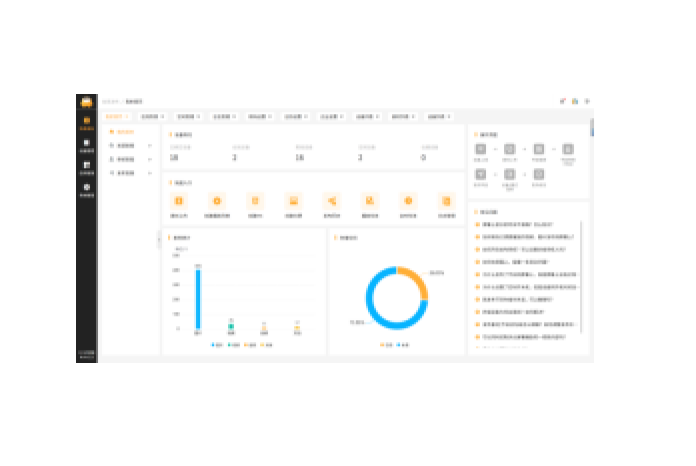
The content management software is installed on the system server and supports functions such as resource file management, custom program arrangement, program
publishing, and centralized terminal control. It enables the distribution of various multimedia program content to different playback display terminals, making multimedia
publishing screen management and control more efficient, flexible, intelligent, and secure. It is widely used in government and enterprise units, commercial centers, retail stores,
hotels, communities, educational institutions, and other venues for advertising and cultural media distribution.
*The homepage provides quick access to frequently used functions and a FAQ module, allowing users to view common questions (text/images) to resolve basic doubts.
It also supports server storage space, material statistics, and real-time usage data viewing.
*It supports publishing image, video, file, and audio material resources. It supports file upload management and includes PNG, JPG, JPEG, GIF, BMP, and TIFF image
formats; MP4, AVI, MKV, RMVB, and TS video formats; MP3 audio format; and PDF, PPT, PPTX, DOC, DOCX, XLS, and XLSX file formats.
*It has a built-in transcoding tool, supporting custom selection of 2K and 4K resolution video transcoding, and allows configuration of screen orientation, resolution,
bitrate, and frame rate parameters.
*It supports batch file upload, one-click preview, quick file location and search, file details viewing, list/grid view, and file group management.
*The platform supports the creation of 6 program types: playlist programs, H5 programs, news programs, live stream programs, web page programs, and split-screen
programs, and supports program group management.
*It has a built-in visual H5 editor, allowing for quick layout by inserting or dragging and dropping components such as text, images, videos, carousels, QR codes, tables,
and countdowns. It supports layer management, attribute and animation configuration; supports landscape and portrait mode switching and custom resolution layout;
and includes 30 built-in general H5 templates, supporting preview, copying, and quick generation.
*It has a built-in visual touch-interactive template layout editor with 4 built-in general layout templates. It supports creating layout programs, including drag-and-drop
layout and combination of commonly used components such as images, videos, carousels, logo walls, card lists, buttons, combo boxes, progress bars, etc. It supports
customizable component attributes such as global, clickable, disabled, component-specific, and animation effects, and supports binding to multiple data sources such as
component static data, CSV files, and APIs.
*Supports split-screen content creation. A single screen can be evenly divided into 1×2, 2×1, or 2×2 split-screen layouts. Different content can be dragged and dropped
to each block, making the operation intuitive and easy to use.
*Supports program review functions, including file upload review and material/program release review. Review configuration allows for freely setting reviewers, up to 5
levels, with a maximum of one reviewer per level. The submitter is notified upon successful or rejected program review, and reviewers are notified when a program is
pending review.
*Pre-release templates allow users to flexibly create release templates, freely combine program content and release rules, and publish templates with one click.
*Release history management: Supports multi-dimensional filtering (resource type, playback type, creation time). Published programs can be undone with one click and
quickly copied as release templates.
*Subtitle insertion function: Supports inserting subtitles (marquee) on the information release screen. Text size, background color, font color, scrolling speed, and display
position can be freely set, with real-time editing and preview.
*Supports management of information publishing terminal devices, with customizable device names; supports automatic scanning of networked devices and creation of
space groups to improve terminal management efficiency.
*Supports batch adjustment of device volume, application restart, device restart, pre-downloading, clearing tasks, touch on/off, screen on/off, time synchronization, and
time display/hide operations.
*Supports viewing device hardware information, viewing device storage usage, clearing device cache, refreshing/downloading screenshots of the current playback
screen, viewing current playback tasks and scheduled tasks by date, pre-downloading materials to specified terminals, and managing pre-downloaded file information.
*Supports setting scheduled power on/off tasks, scheduled restart tasks, and scheduled screen on/off tasks for devices, with options for single, daily, or custom
execution.
*Supports instant and scheduled publishing, with options for permanent effect or specified end time; supports configuring playback plans by date or continuous period,
supports automatic playback of programs in priority order, supports terminal grouping and unified management, and supports the function of canceling unfinished
programs. Achieve centralized and unified management of screens, enabling rapid information publishing and updates; support emergency text notification insertion.
*The system supports synchronized video playback across multiple Android terminals, achieving frame-level synchronization based on a master-slave timing calibration
mechanism, ensuring smooth and consistent switching between multiple screens.
*Supports unified management and control of Android and Windows terminals, and allows publishing PPT files with animation effects on Windows publishing terminals.
*Supports viewing and filtering login logs, operation logs, and device logs for convenient maintenance.
*Address book management, supporting account enabling/disabling; disabled accounts cannot log in to the system, and account passwords can be reset.
* Supports administrators creating multiple roles, each with different management permissions. Device management permissions can be assigned individually, providing
flexible and customizable system permissions.
*Supports login verification code verification, automatic logout mechanism, regular password updates, locking of inactive accounts, and SSH remote management,
ensuring multi-dimensional security for system operation and access.
*Supports customizable calendar periods, allowing flexible configuration of weekday, holiday, and weekend rules, and provides unified configuration for scheduled tasks
and content publishing rules based on a standard calendar.
*Supports access and remote operation of the information publishing system via a dedicated Android or iOS app. It supports uploading local images, documents, videos,
and audio materials to mobile devices, creating and editing programs, approving uploaded materials and published programs, and remotely monitoring device status and
managing device control.
Please leave a message if necessary, we will contact you as soon as possible!